

Yes—TheIsleMinimap works on both official The Isle servers and community servers when the session uses the supported EVRIMA Gateway map. You do not need a special server, a server-side plugin or permission from an administrator. The app reads your own position locally and places it on the Gateway map.
Official server or community server, the navigation workflow is the same: play The Isle: EVRIMA on Gateway, capture your own Asset Location coordinates, and use TheIsleMinimap to follow your position, layers and route.
Why the server type does not change the minimap
TheIsleMinimap is an independent Windows companion for The Isle: EVRIMA Gateway map. Its core navigation tools run on your computer. It does not need to connect to the game server, install a server mod or receive access to a community server's private systems.
Your marker is based on the Asset Location coordinates that EVRIMA shows to you. You can update it through the app's local screen-reading option or by clicking the coordinates in the in-game panel so Windows copies them to the clipboard. The app then translates that position onto its Gateway map.
That local workflow is why the same The Isle map can be used after joining an official server, a realism community, a PvP community, a beginner-friendly server or a private session—as long as the server is running the supported Gateway map.

Using TheIsleMinimap on official The Isle servers
Official servers do not require any extra setup. Open TheIsleMinimap, launch EVRIMA, and use the normal coordinate workflow described in the Asset Location coordinate guide. Once the app has a valid position, it can show your current location on Gateway and keep the map available above the game in windowed or borderless-fullscreen mode.
The useful part is not only seeing a marker. The Gateway map layers can help you check location names, landmarks, drinking water, sanctuaries, migration zones, patrol zones, roads and trails, caves, salt licks, mud areas, plant resources, animal markers and Earthworks resources. You decide which information is visible instead of covering the entire map with markers.
For solo play on official servers, those tools stay local. The app does not reveal hidden players or pull information from the server.
Using TheIsleMinimap on community servers
Community servers often have their own rules, events, play styles and Discord communities, but those differences do not change Gateway's coordinate system. If the community server is using the supported EVRIMA Gateway map, TheIsleMinimap can use your coordinates in the same way it does on an official server.
No community-server owner has to integrate TheIsleMinimap. You do not enter the server IP address into the app, and the app does not need an administrator account. Always follow the individual server's rules about overlays, maps and group coordination; the technical compatibility does not replace those community rules.

What works on every supported Gateway server?
- Current position: place your own Asset Location coordinates on the Gateway map.
- Automatic local reading: optionally read the selected on-screen coordinate area without uploading captured screen content.
- Map layers: turn categories and individual markers on or off for the route you are planning.
- Zoom, pan and grid controls: move between a full Gateway overview and a closer local view.
- Movement trail: keep an optional local history of your recent route.
- Quick Access: keep your most-used map and settings controls beside the map.
- Private squads: eligible Full plans can share current positions and one destination pin with invited teammates, independently of the server owner.
Private squad sharing is optional and limited to people who join with the private code. It is not a public server tracker. Read the private squad guide for the exact sharing controls.
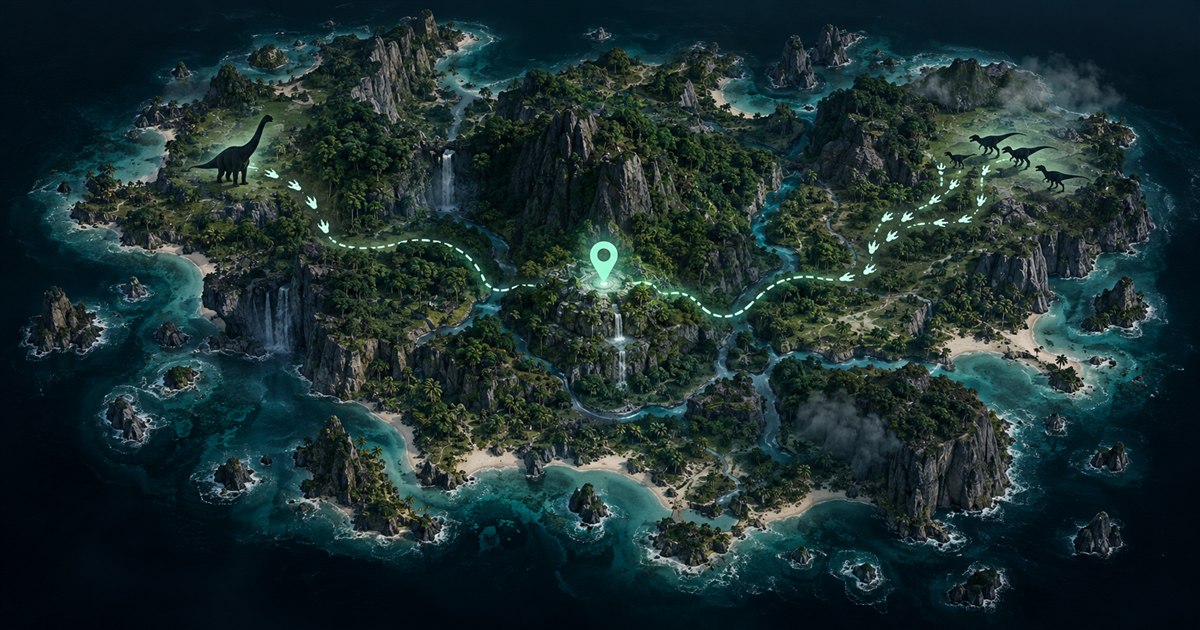
The important compatibility requirement: EVRIMA Gateway
TheIsleMinimap is built for The Isle: EVRIMA Gateway map. It is not a Legacy map and should not be used for a server running a different or unsupported map. If your location appears wrong, first confirm that your Steam installation is on the EVRIMA branch and that the server session is using Gateway.
This distinction matters more than whether the server is labelled official or community. The supported map and coordinate format determine compatibility.
How to start using the The Isle EVRIMA map
- Open TheIsleMinimap and confirm your license is active.
- Launch The Isle: EVRIMA and join an official or community server running Gateway.
- Open the in-game panel that displays Asset Location.
- Click the coordinates for clipboard capture, or configure the optional local screen-reading area.
- Choose the map layers you need and plan your route.
The complete TheIsleMinimap tutorial includes current screenshots for the main map, coordinate capture, layers, Quick Access, privacy settings and squads.
The Isle map and server compatibility FAQ
Does TheIsleMinimap work on official servers?
Yes. Join a supported EVRIMA Gateway official server and use your own Asset Location coordinates. No official-server integration is required.
Does it work on The Isle community servers?
Yes, when the community server is running the supported EVRIMA Gateway map. Custom rules or events do not normally change the local coordinate workflow.
Does the community server need to install anything?
No. The core Gateway minimap, coordinate reading, layers and movement tools run locally on your Windows PC.
Can it show every player on the server?
No. TheIsleMinimap is not a public player tracker. It shows your own locally captured position. Optional private squads share current positions only between invited squad members.
Is this a The Isle Legacy map?
No. TheIsleMinimap is designed for The Isle: EVRIMA on Gateway, not the Legacy branch or an unsupported map.
Compare Solo Lifetime and Squad plans, then choose the setup that fits official-server runs or community-server sessions.