
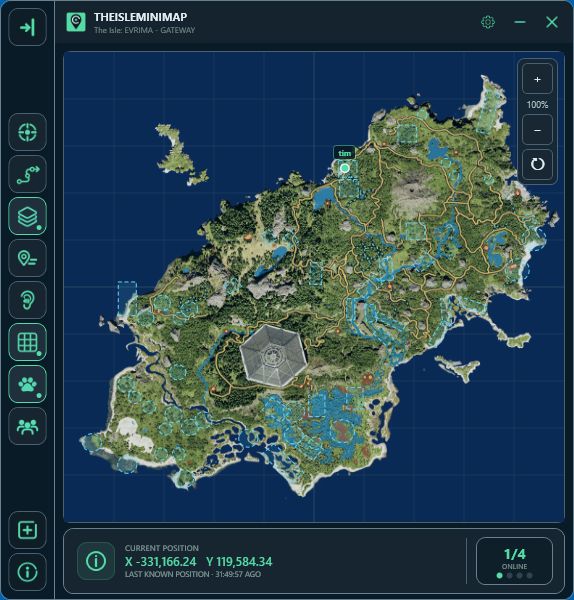

Explore 01
A minimap built around Gateway

Zoom, pan & reset
Look closer, explore a route and return to the default view.

Your layers
Choose General, Animals, Plants and Earthworks, with individual filters.
Grid, trail & follow
Use an independent grid, a local movement trail and optional recentering when your marker leaves view.
TheIsleMinimap is a compact 64-bit Windows companion for The Isle: EVRIMA. It keeps the current Gateway map available in a dedicated overlay so you can orient yourself without repeatedly switching to a browser map. Zoom, pan and recenter controls remain close at hand, while the optional map grid and movement trail can be enabled only when they are useful.
The app does not inject into the game, inspect game memory or read network packets. Position updates come from the Asset Location coordinates displayed in the in-game Tab panel.

Explore 02
Choose how your position updates

Automatic reading
Read your approved Asset Location area locally while the coordinates are visible.
Clipboard capture
Click the in-game coordinates to copy them; no separate paste is needed.
For the fastest workflow, optional local screen reading can watch the selected Asset Location area after you open Tab. It follows the selected game area when the window size, display or Windows scaling changes and checks the visible coordinates before moving your marker. If you prefer a fully manual action, click the coordinates in the game and clipboard monitoring updates the marker without requiring you to paste them.
Both approaches keep coordinate processing on your computer. The Current Position panel shows the active capture method and when the position last updated, and you can change the capture method at any time in Map Settings.

Explore 03
Solo navigation or a private squad
Solo Lifetime
Local map tools, your own marker color and up to three personal pins stored on this computer.
Squad plans
Core map tools plus a private group of up to four, latest shared positions, member markers and one shared destination pin.
Solo Lifetime includes the Gateway map, local coordinate reading, map layers, filters, zoom, pan, grid control, optional movement trails, a personal marker color and up to three local pins. Squad plans include the core map tools and a private squad for up to four players, each member’s latest shared position, personal colors and optional short names, plus one shared destination pin.
Compare the available plans, explore every map layer, or read the detailed coordinate-reading guide.